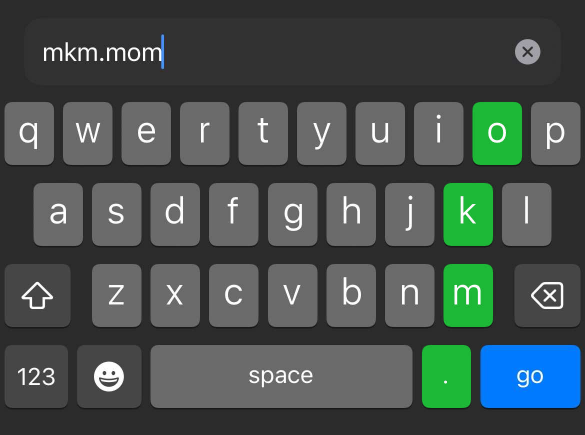
?What is MKM.mom?
MKM.mom gives you a personal web address that's lightning-fast to type on a phone — the keys O, K, M and the “.” sit right next to each other. No need to memorize all your magic site URLs anymore. In performance you can quickly open your page on the spectator's device to reach a prediction, a force page, or any link you need (Inject, Goo, Elips or WEB-doodle etc.).
Your page only shows its real content when you've armed it. The rest of the time it looks like a harmless, unrelated page — so a curious spectator who pokes around learns nothing.
Tip: kkk.mom is an alias — it points to the same place as mkm.mom.
1How to register
Your MKM.mom page is set up and managed through your BS Magic account, in the Account Manager.
Right now — BASIC & PREMIUM subscribers
MKM.mom is included free with an active BASIC or PREMIUM MysterSmith subscription. To create your page:
- Sign in to your BS Magic account with your Apple ID or Google account.
- Open the MKM.mom section.
- Pick a username and a passcode — your page is ready right away.
Coming soon — open to everyone
Public registration is opening later: anyone will be able to get an MKM.mom page with a paid subscription. You'll still set it up from the same Account Manager, so a (free) BS Magic account is all you need to begin.
- 9 EUR / 3 months
- 29 EUR / 1 year
- Free for BASIC & PREMIUM MysterSmith subscribers
MINI subscriptions don't include MKM.mom.
2Getting started
You have two things: a username and a passcode.
Your public page
yourname.mkm.mom — this is what the spectator sees. When it's not armed it shows a neutral cover.
Your private dashboard
yourname.mkm.mom/PASSCODE — open this on your own phone to manage everything. After you sign in, the passcode is removed from the address bar automatically.
3Arming & disarming
“Arming” is what makes your page go live. Until you arm it, visitors only ever see the neutral cover — no links, no hint that anything is there.
From your dashboard:
Arm 15m Arm 60m Always ON Disarm
- Arm 15m / 60m — the page is live for that many minutes, then quietly goes dark again.
- Always ON — stays live until you turn it off (use with care).
- Disarm — turn it off right now.
You can also arm straight from a URL on your own phone: yourname.mkm.mom/PASSCODE/30 arms it for 30 minutes (any number of minutes works).
4Your links
Add as many links as you like from the dashboard. How they appear to the spectator depends on how many are visible:
- One visible link → the page redirects straight to it (they never see MKM.mom at all).
- Two or more → they appear as a tidy list of buttons to tap.
For each link you can edit it, hide/show it, reorder it, or delete it. Hidden links stay saved but don't appear on the public page — handy for prepping several tricks and revealing only the one you need.
5The safe routine (and NFC tags)
The golden rule: never let your passcode reach a spectator's device. Here's the clean way to work:
- On your own phone, arm your page ahead of time — tap Arm 15m/60m, or open yourname.mkm.mom/PASSCODE/30.
- When you need it, just open the bare address yourname.mkm.mom on the spectator's phone. No passcode involved.
- Afterwards it disarms on its own (or tap Disarm).
6Public-view options
Fine-tune how your public page behaves (all in the dashboard):
- Auto-disarm after use — the page turns itself off the moment a link is opened. Great for one-shot reveals.
- Leave no back-button trail — opening a link replaces the page, so the spectator's back button skips right past MKM.mom.
- Allow once per device — once a device has opened a link, it can't reopen the page. Clear it on that device with yourname.mkm.mom/PASSCODE/reset.
- Two-column buttons — show your link buttons in two columns.
- “Disarm now” button — when a button list is showing, a red Disarm now button lets you (or you handing over the phone) kill the page in one tap.
7Optional public-view PIN
For an extra layer, set a 4-digit PIN. When it's on, visitors must key it into an on-screen keypad before any links appear. A wrong PIN just shows the neutral cover — giving nothing away.
This is separate from your dashboard passcode, and it's entirely optional. Leave the field blank to remove it.
8Managing your account
Change your passcode
Set a new one from the dashboard — no need to type the old one, your session proves it's you. Afterwards your sign-in address becomes yourname.mkm.mom/NEWPASSCODE.
Reset a “used” device
If Allow once per device blocked a phone you want to reuse, open yourname.mkm.mom/PASSCODE/reset on that device to clear it.